Xernel AION 2 — healing, collection and quests
Xernel brings routine AION 2 actions and character, target and party information into one interface. Check the requirements before selecting a period.
Choose period
Xernel
Before you buy
- Operating system
- Windows 10, Windows 11
- Processors
- Intel and AMD
- Game mode
- Windowed, Borderless
This is a summary. Check all requirements and ask the seller about unknown conditions.
Payment goes through the seller’s own storefront (eliteseller.ru). Delivery and order support are handled there — the terms are shown on the payment page before you confirm.
This is a digital product: there is no physical shipping or separate shipping charge.
Screenshots
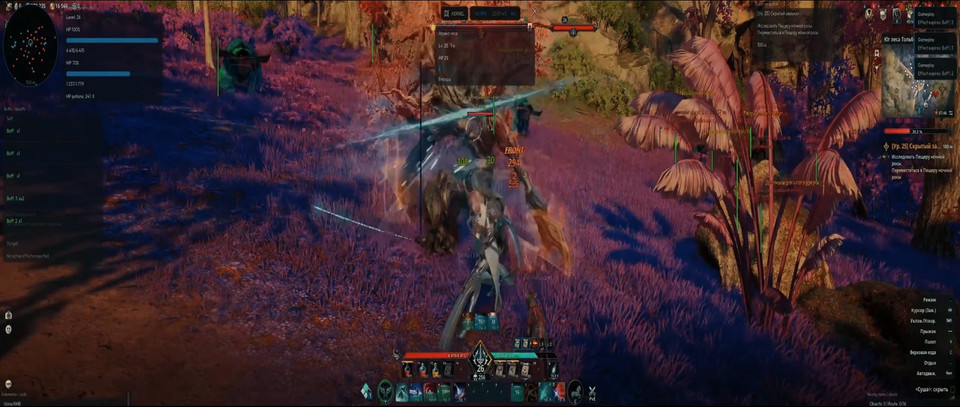
Video demo
The player needs scripts, and they are currently off: Watch onKinescope →
Features
29Healing
- Auto-heal your character and selected target with separate HP thresholds and self-healing priority.
- Automatically use health potions with inventory and cooldown checks.
- Pause the rotation when MP is low.
Loot and interaction
- Automatically collect loot and resources and interact with world objects.
- Pick up dropped items within a configured radius and identify available actions from context.
Objects and routes
- List nearby items, chests and resources; object boxes follow their actual bounds.
- Up to 16 route points and automatic route construction using the nearest points.
- Direction arrow, distance and elevation display.
- Filter objects by name, including Cyrillic text.
Quests
- Active quests, objectives and destination markers.
- Navigate to a quest with one key.
- Quest progress and completion notifications.
Party and raid
- Member HP, MP and AP; Offline, Dead and Out of Range statuses.
- Member buffs and debuffs.
- Healing recommendation for the member with the lowest HP.
- Party notifications and ability readiness alerts.
Buffs and debuffs
- Effect panels for your character, selected target and party.
- Names from the game localization and descriptions from in-game tooltips.
- Timers, local expiration times, urgency sorting, stacks and permanent-effect markers.
Target information
- Name, HP, level, guild, title and distance from the game HUD.
- Boss AoE warnings and alerts when the target uses an ability.
- Timer interpolation between HUD updates.
Interface
- Movable panels with saved positions, theme switching and in-game notifications.
- HP, MP, AP and ability cast indicators.
- Cyrillic, Korean and Chinese text support.
Automation controls
- Quickly enable or disable combat functions.
- Automatically pause when menus, dialogs or chat open, when the game loses focus, after death and during your own ability cast.
- Automatically release held keys.
- Press END to stop all automation.
Safety
Windows 10/11, Intel/AMD CPUs and windowed or borderless mode are supported. There is no built-in spoofer or OBS recording bypass.
System requirements
| Os | Windows 10, Windows 11 |
|---|---|
| Processors | Intel and AMD |
| Game mode | Windowed, Borderless |
| Built in spoofer | No |
| Obs bypass | No |
Healing and item collection
Set separate HP thresholds for yourself and the selected target, with priority for self-healing. Automatic health potion use checks inventory and cooldowns; low MP pauses the rotation.
Loot and resource collection can run automatically. World-object interaction checks which action is available, and the dropped-item pickup radius is configurable.
Routes, quests and party information
Nearby object lists include items, chests and resources. Name filters accept Cyrillic text, while routes can contain up to 16 points. Direction, distance and elevation guides assist navigation. Quest markers, one-key navigation and progress notifications keep objectives visible.
Party and raid panels track HP, MP, AP, member status and effects, with a recommendation for healing the member with the lowest HP. Target information includes ability alerts and boss AoE warnings.
Automation controls
Move panels and save their positions. Automation pauses for menus, dialogs, chat, focus loss, death and your own ability casts. END stops automation completely.
Period and checkout
Choose 1, 3, 7 or 30 days on the shared EliteSeller checkout page. Every purchase button opens that form. Confirm the final amount and payment terms there. The supplier lists automatic delivery of an activation key.
What to know before buying
How payment and delivery work
Checkout happens on the seller's side: for most cheats that is Digiseller, where the key appears on the order page as soon as the payment clears and is mirrored to your email. Some cheats are delivered manually — the key arrives once the seller confirms the order, and that is almost always the only reason for a delay. The licence countdown starts when the key is activated, not when you pay.
Ban risk, plainly
There is no safe cheat — only different odds of being caught in the next wave. Nobody compensates a lost game account: the key pays for access to software, not for an outcome.
Why cheats get detectedBefore the first launch
The routine is always the same: set the window mode from the requirements, start the software before entering a match, and do not switch everything on at once. The most dangerous window is the first days after a game or anti-cheat patch.
Safe launch checklist