Mason hack for Rust
Mason Full covers both sides of Rust — aim modules and on-screen data — across 67 menu entries. 4 licence lengths to choose from.
Choose period
Mason
Payment and delivery via Digiseller. The key arrives by email right after payment.
This is a digital product: there is no physical shipping or separate shipping charge.
Screenshots
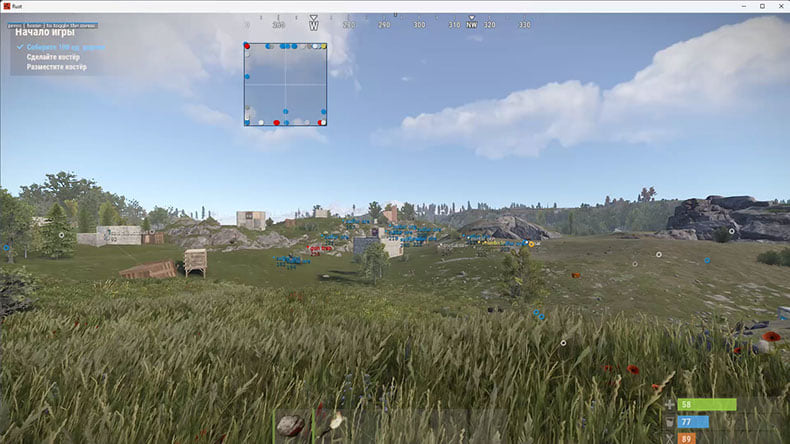
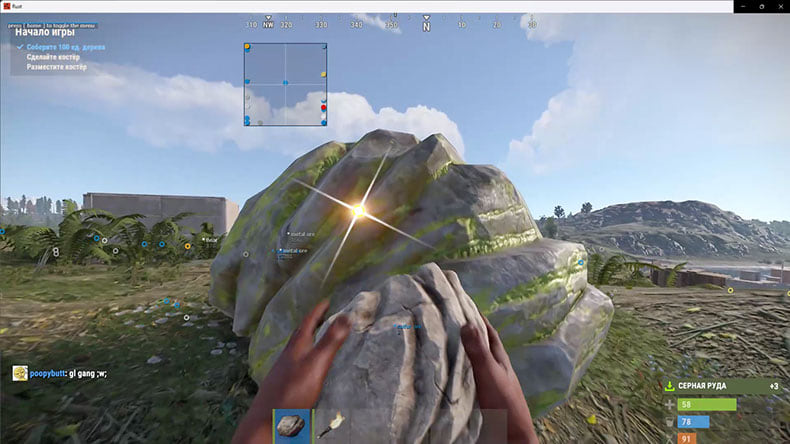
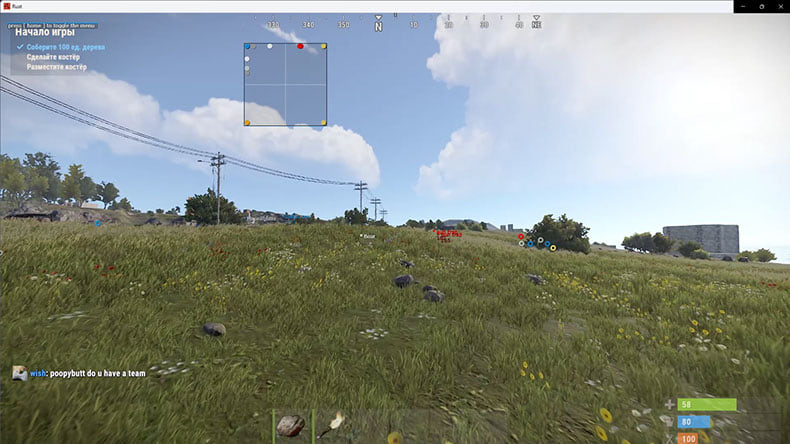
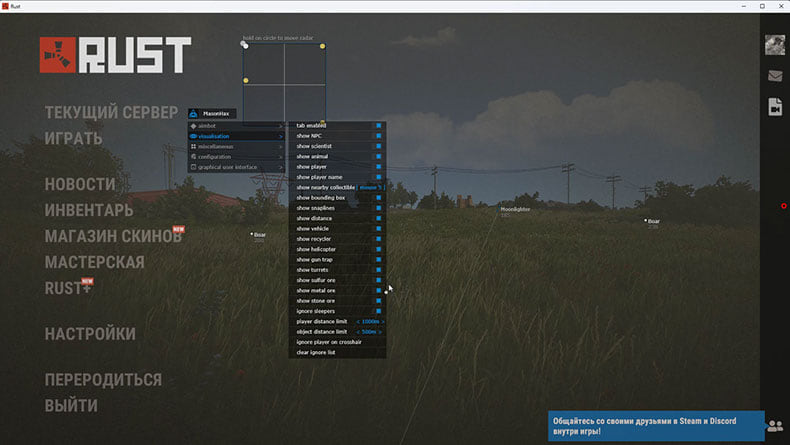
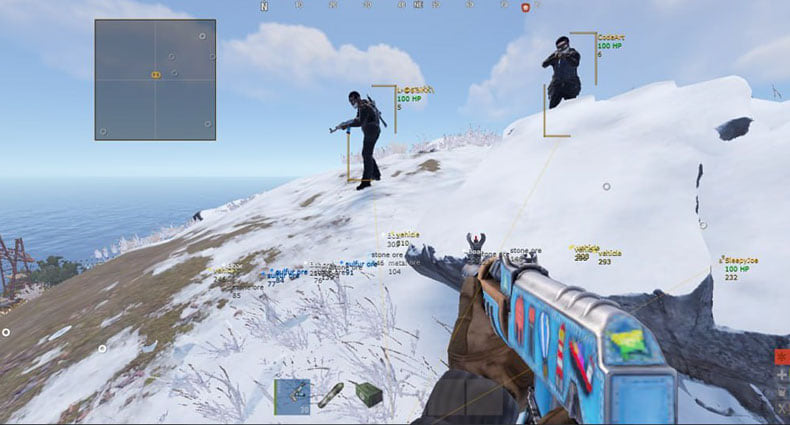
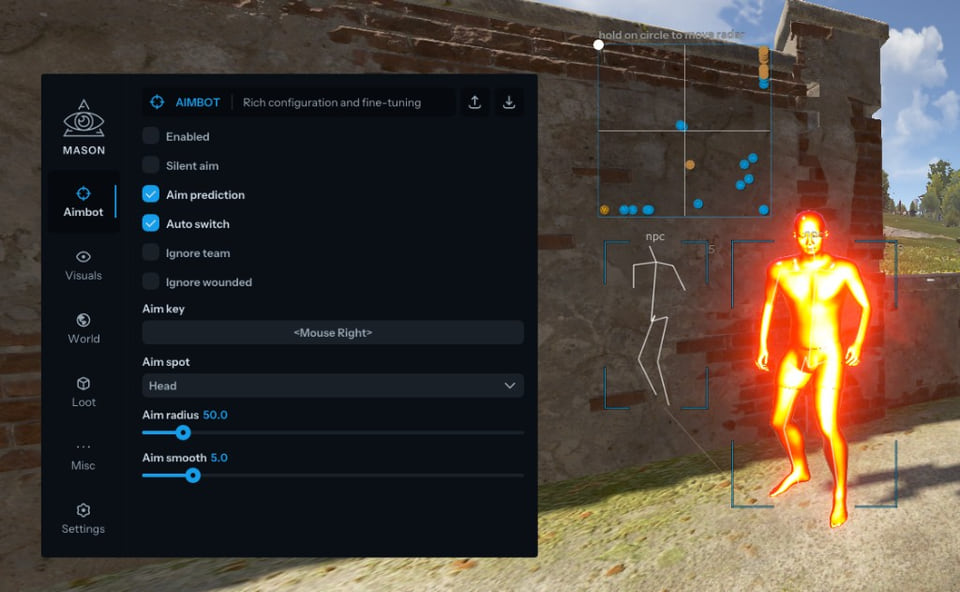
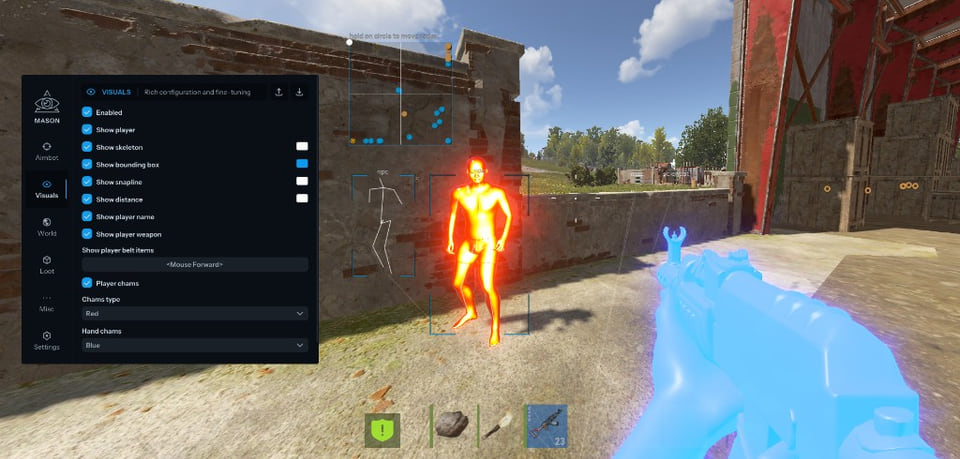
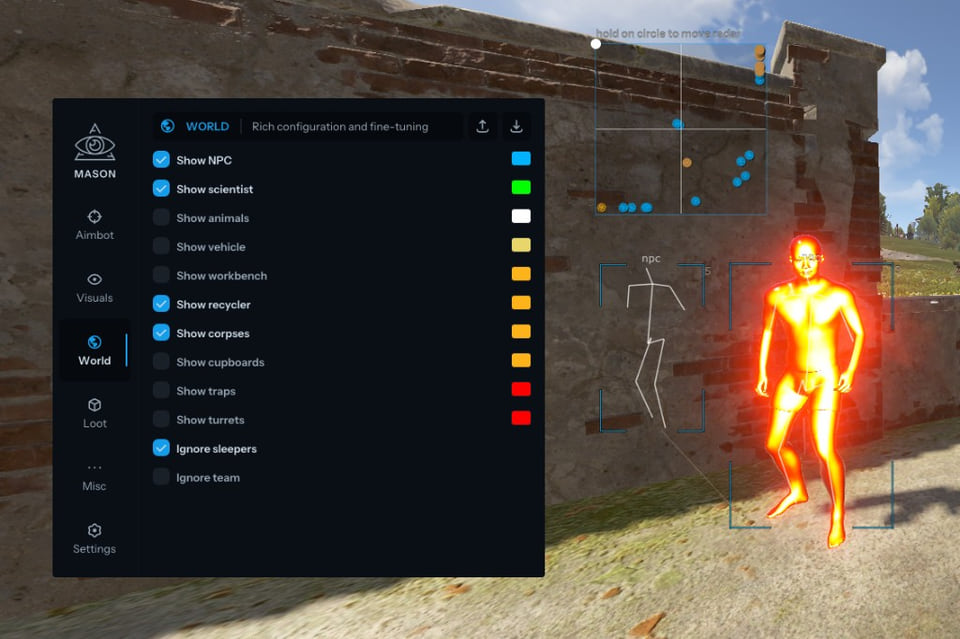
Video demo
The player needs scripts, and they are currently off: Watch onYouTube →
The player needs scripts, and they are currently off: Watch onYouTube →
Features
67AIMBOT
- VECTOR AIM VERSION IS TEMPORARILY OUT OF SERVICE / SILENT VERSION IS FUNCTIONAL
- When aimbot is activated, target display is automatically enabled
- Tab enabled / Enable aimbot
- Silent Aim / Hit targets without aiming directly at them
- Aim prediction / Enable prediction for aimbot
- Auto switch / Auto-switch to next target within radius
- Aim key / Key to activate aimbot (hold to use)
- Aim spot / Select body part for aim target
- Aim radius / Set aimbot working radius
- Ignore team / Ignore allies
- Ignore wounded / Ignore wounded players
- Aim smooth / Aiming smoothness (LOW SMOOTH = ban risk)
PLAYERS ESP
- Tab enable / Enable ESP
- Show bounding box / 2D boxes around players
- Show snapline / Lines to players
- Show distance / Distance to players
- Show player name / Player names
- Show player weapon / Player weapons
- Show player belt items / Player belt items
- Ignore sleepers / Ignore sleeping players
- Players distance limit / Player display distance
- Show skeleton / Player skeletons
- Show out of FOV players / Arrows for enemies behind you
- Show dormant / Last known player position without client data
WORLD ESP
- Show NPC / NPCs
- Show scientist / Scientists
- Show animals / Animals
- Show vehicle / Vehicles and their names
- Show copters / Copters
- Show crates / Crates
- Show cupboards / Cupboards
- Show food / Food
- Show supply drop / Airdrops
- Show traps / Traps
- Show turrets / Turrets
- Show recycler / Recyclers
- Show workbench / Workbenches
- Show nearby collectible / Nearby collectible items
- Show nearby dropped items / Dropped items nearby
- Object distance limit / Object display distance
RESOURCES ESP
- Show sulfur ore / Sulfur ore
- Show metal ore / Metal ore
- Show stone ore / Stone ore
- Show wood pile / Wood piles
CHAMS
- Chams Type / Chams for visible enemies: Pink, Blue, Green, Red. Hidden enemies displayed as White
- Show bullet tracers / Bullet trajectories
MISCELLANEOUS
- Tab enable / Enable additional features
- Full bright / See at night as in daytime
- Instant Eoka / Instant Eoka firing
- Camera Zoom / Zoom camera by key press
- Interactive Free Cam / Free camera (at your own risk) / TEMPORARILY OUT OF SERVICE
- Remove constructions / See through walls
- Custom sky color / Change sky color
- FOV Changer / Change game FOV
CONFIGURATION
- Save cpu / Save CPU resources
- Menu key / Key to toggle cheat menu
- Panic key / Emergency cheat shutdown
- Battle mode key / Player-only display mode
- Load config from clipboard / Load config from clipboard
- Save config to clipboard / Save config to clipboard
- Visuals font size / Font size for visuals
GUI / RADAR
- Show aim radius / Aimbot radius on screen
- Show crosshair / Crosshair in center of screen
- Show radar / Radar display
- Radar size / Radar size
- Radar radius / Radar working radius
- * The functionality of the program may be changed at any time at the discretion of the developer, but we always strive to keep the information up to date.
Safety
Run the first session with a minimal set of modules and in the required window mode.
BIOS and system settings are part of the requirements: UEFI. Check using the instructions. Change them once, before the first launch. The declared bypass covers software capture only, not a camera pointed at the screen.
System requirements
| Supported game version | Steam |
|---|---|
| Supported game mode | Windowed / Fullscreen in window |
| Supported os windows | 10 & 11 x64, versions (2004 / 20H2 / 21H1 / 21H2 / 22H2 / 23H2 / 24H2 / 25H2 / 26H1), check your build using the instructions <a href="/en/articles/windows-build/">HERE</a>. Optional support for Windows 11 version 24H2, functionality is not guaranteed |
| Supported anti-cheats | Easy Anti-Cheat |
| Supported processors | Intel and AMD |
| Support for invisibility on videos or screenshots | Yes |
| Bios boot mode | UEFI. Check using the instructions <a href="/en/articles/uefi-boot-mode/">HERE</a> |
| System disk boot record format | GPT. Check using the instructions <a href="/en/articles/disk-gpt-format/">HERE</a> |
| Additional requirements for the windows system | Enable VT-x / VT-d (Virtualization) / Enable Hyper-V / Disable Secure Boot |
| Usb flash drive required | Yes |
Mason Full is a full cheat for Rust. It comes from Mason. The published feature list runs to 67 items. Menu sections: Aimbot, Players esp, World esp, Resources esp, Chams and Miscellaneous.
What it needs to run
The developer states the following: window mode: Windowed / Fullscreen in window; CPU: Intel and AMD; game version: Steam. The requirements name EAC, so its updates land on this cheat sooner or later. System and BIOS settings are part of the requirements: UEFI. Check using the instructions. A removable drive is needed: Yes. Also stated: Enable VT-x / VT-d (Virtualization) / Enable Hyper-V / Disable Secure Boot. Screen capture bypass is declared.
What it actually does
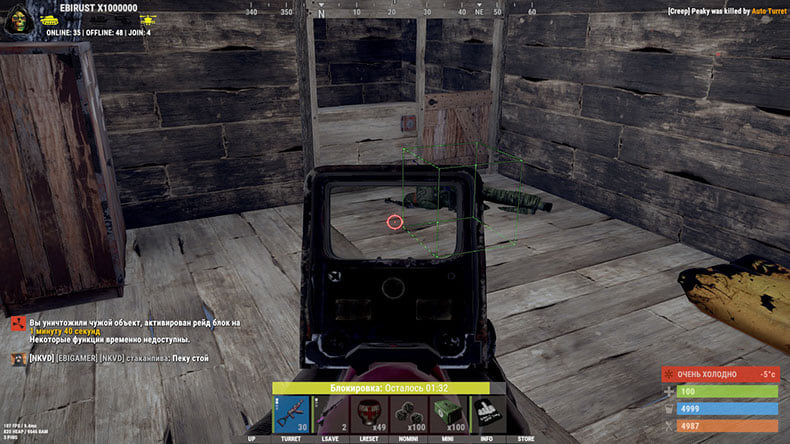
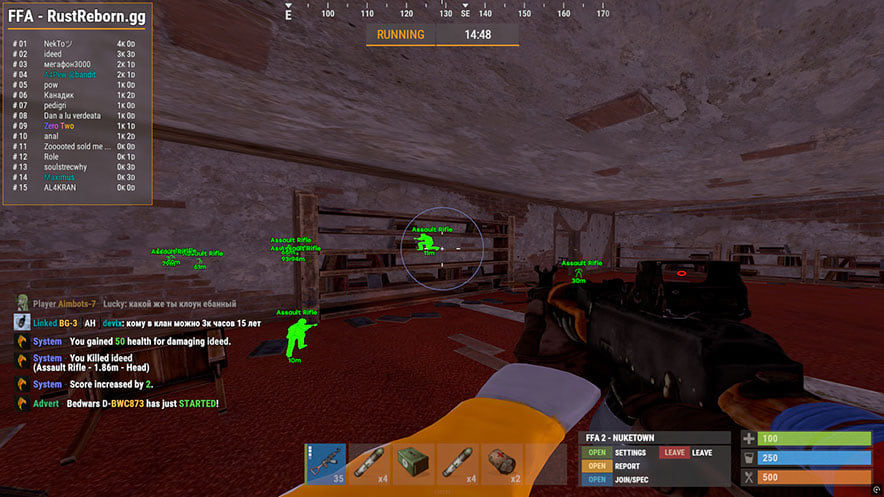
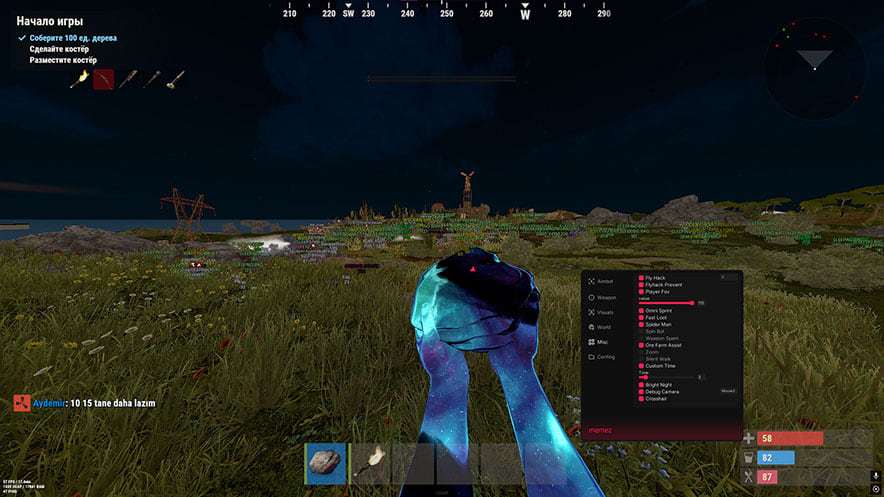
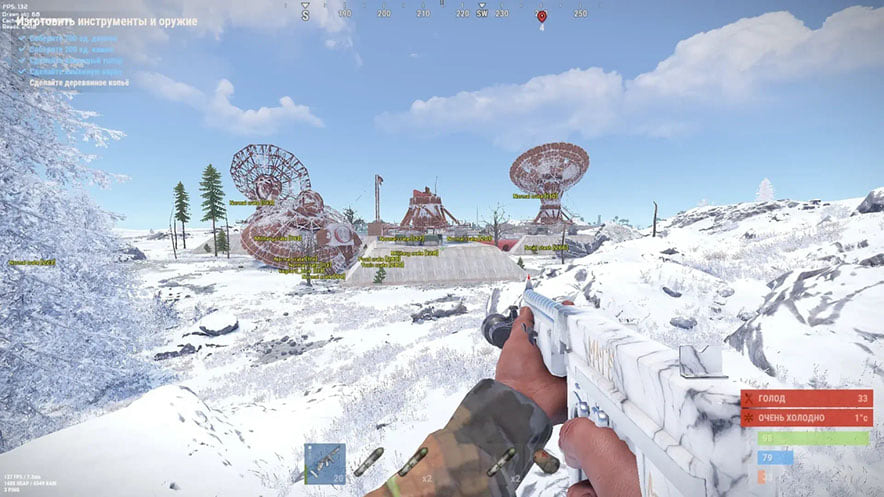
What the menu boils down to: a flat radar with live positions, aim assistance that pulls the crosshair onto a target, opponents drawn on top of the map geometry, player models filled with a contrasting colour, vehicle markers and markers for items, containers and stashes. Settings live in config profiles.
Access periods
Licence lengths available: 1 day, 3 days, 7 days and 30 days.
Against the neighbouring cheats
Mason has 2 more builds in this section, which is what to compare against first.
What to know before buying
How payment and delivery work
Checkout happens on the seller's side: for most cheats that is Digiseller, where the key appears on the order page as soon as the payment clears and is mirrored to your email. Some cheats are delivered manually — the key arrives once the seller confirms the order, and that is almost always the only reason for a delay. The licence countdown starts when the key is activated, not when you pay.
Ban risk, plainly
There is no safe cheat — only different odds of being caught in the next wave. Nobody compensates a lost game account: the key pays for access to software, not for an outcome.
Why cheats get detectedBefore the first launch
A radar renders on a second screen or phone and never touches the game itself — that is what makes it calmer than internal cheats. The phone link needs both devices on one network, so set it up before the match, not in the lobby.
Safe launch checklistSetup guide
This page walks you through starting any Mason cheat: how to prepare the game, download and run the loader, complete the injection, and open the in-game menu. The second part shows how to store your settings in a text file so you can reload them on later sessions.
FAQ
How does Mason Full differ from the other cheats here?
How long can I buy Mason Full for?
What is included in Mason Full?
Will the overlay show up in recordings?
Other cheats for Rust
Mason: utility for Rust
MasonMason is a single-purpose tool for Rust. 4 licence lengths to choose from.
Mason Internal: full cheat for Rust
MasonMason Internal is an all-in-one cheat for Rust, from crosshair assistance to map markers. The menu is large — 138 entries.
Memez hack for Rust
MemezMemez Internal Rust is an all-in-one cheat for Rust, from crosshair assistance to map markers. Supported client: Steam.
Mh hack for Rust
MhA visuals-only cheat for Rust: Mh Rust tells you what is around, the shooting stays manual. Supported client: Steam.